SQL: Definitions and Commands
What are a database and SQL?
Database
A collection of Information.
- With this kind of basic information in one table, we could use a spreadsheet like Excel to keep track of our data.
- But databases allow us not only to add more tables but also to set up rules and relationships between the tables.
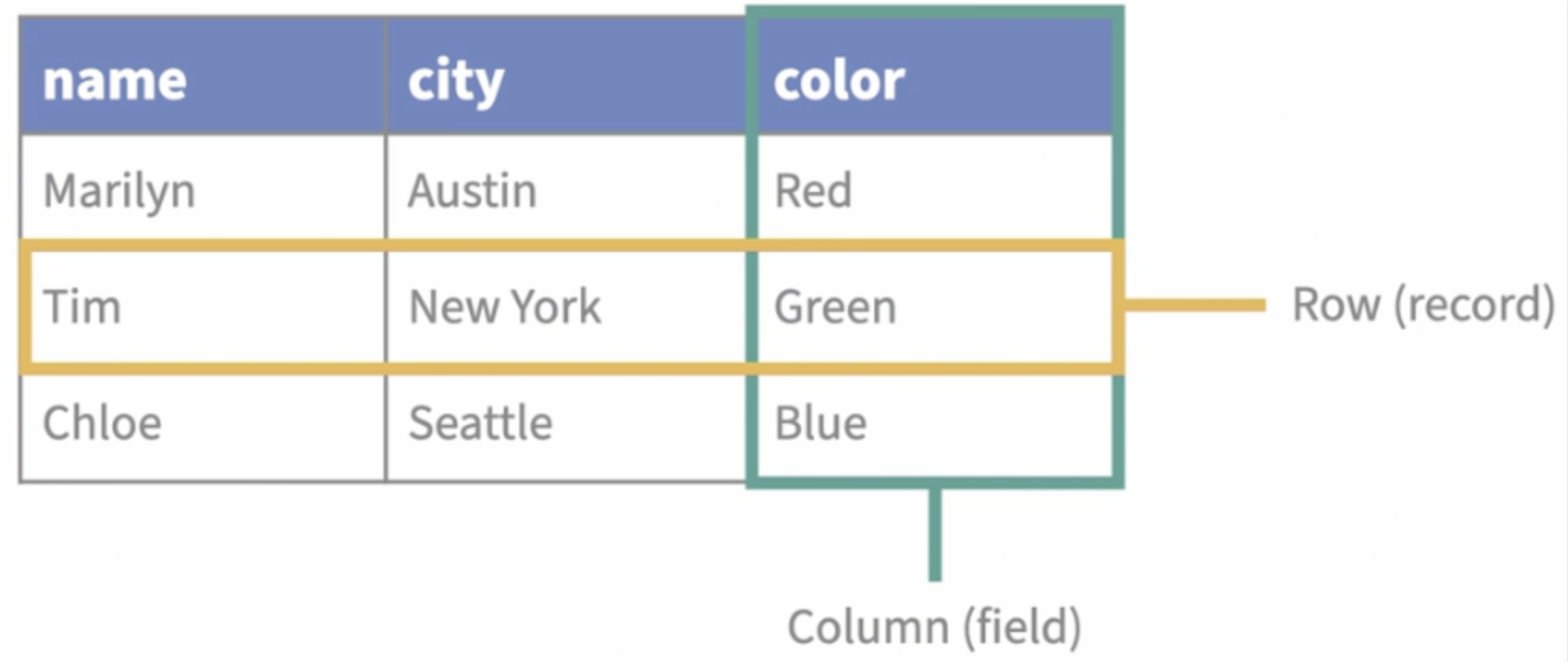
- Fields and records make up a table, and one or more tables make up a database.
- The layout and definition of how fields, tables, and relationships are set up are called the schema of the database.
SQL
SQL stands for Structured Query Language, which is a language for manipulating and defining data in databases.
- SQL gives us a way of writing questions a database can understand.
- SQL is generally
white space independent, meaning that if you want to add some space or lines between clauses or expressions to make your statement easier to read, you can do so.
Statement
-
Statement: something you write in SQL to get an answer from a database or to make a change.
-
A statement is made up of clauses. Clauses are the basic components of statements, the smaller building blocks that make up the whole building.
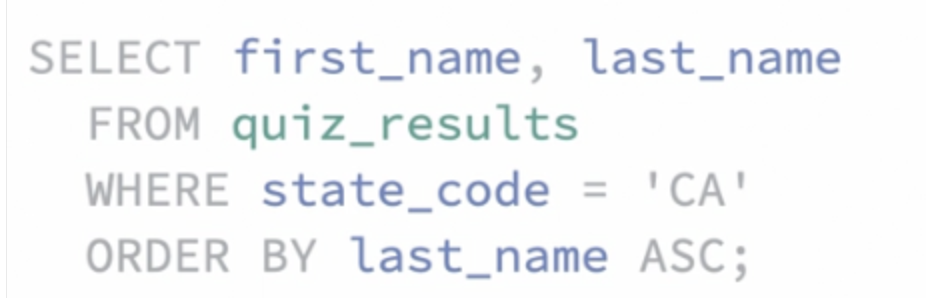
These clauses are constructed out of various elements, including keywords, which are special or reserved words that tell the database to take some action, field names, which let us refer to fields or columns of data whose values we want to use, table names, which tell the database which table to use, and predicates, which we use to specify what information or condition we’re looking for.
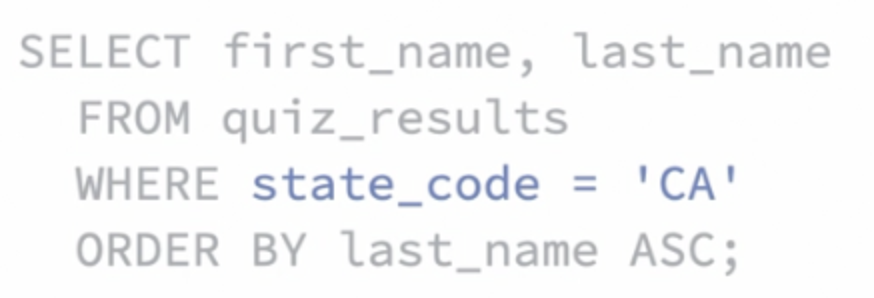
- Predicates include
a value or conditioncalled an expression. - A clause can be a statement if you’re writing a really basic one.
- These keywords and operators are customarily written in uppercase, though usually, they don’t have to be.
- At the end of a statement, we put a semi-colon.
SQL statements can also be used to add, modify, or delete data in a database or even to create, modify, and remove tables.
Ask for Data from a Database
1. SELECT
The SELECT keyword tells the database we want some information returned to us.
- SELECT first_name FROM people;
- If I wrap that field identifier in single quotes, ‘first_name’, we’d get back the text string instead.
- We can change the order of the fields too.
- Wild card operator: the star or asterisk. *
Aggregate Window Functions
1) COUNT ()
SELECT SUM(quiz_points) / COUNT(*)
FROM people
GROUP BY team;
Remember, these math operations that we can do, in this case division, are integer operations if they’re being performed on integer values.
- So, instead of making an average ourselves, we can use another aggregate function, AVG, which gives us the average to higher precision.
2) AVG()
SELECT team, COUNT(*), SUM(quiz_points), AVG(quiz_points)
FROM people
GROUP BY team;
3) SUM()
SELECT SUM(quiz_points)
FROM people;
4) MAX(), MIN()
SELECT MAX(quiz_points), MIN(quiz_points)
FROM people;
String Functions
1) LOWER(), UPPER()
SELECT LOWER(first_name), UPPER(last_name)
FROM people;
2) SUBSTR( , , )
- In most SQL implementations, substring is the name of the function. But here in SQLite, it’s SUBSTR, which is a substring of the word substring.
-
A number representing at which character in the longer string to start counting and the length after which to stop in characters. I want to start with the first character and then proceed with five characters after that to get the first five characters of the last_name field.
SELECT first_name, SUBSTR(last_name, 1, 5)
FROM people;
3) REPLACE
SELECT REPLACE (first_name, "a", "-")
FROM people;
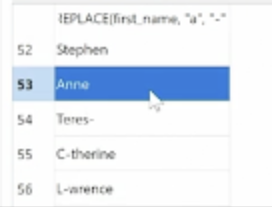
- This replacement is case-sensitive, so keep an eye out for that.
- REPLACE(string, old_string, new_string)
- In fact, if I scroll down here to row 53, Anne still has a capital A because capital A is a different character than lowercase a.
4) CONCAT / +
- The CONCAT() function adds two or more strings together.
- The + operator allows you to add two or more strings together.
- The CONCAT_WS() function adds two or more strings together with a separator.
SELECT CONCAT('SQL', ' is', ' fun!');
SELECT CONCAT('SQL', ' ', 'is', ' ', 'fun!');
SELECT 'SQL' + ' is' + ' fun!';

SELECT CONCAT_WS('-', 'SQL', ' is', ' fun!');
/* SQL- is- fun! */
5) LEFT / RIGHT
- The LEFT() function extracts a number of characters from a string (starting from left).
- Extract 5 characters from the text in the “CustomerName” column (starting from left):
SELECT LEFT(CustomerName, 5) AS ExtractString
FROM Customers;
6) LEN()
- Return the length of a string:
SELECT LEN(' W3Schools.com ');
7) DISTINCT
Let’s take a look at pulling out only the unique values or the values that are distinct from one another with the DISTINCT function.
SELECT DISTINCT(frst_name)
FROM people
ORDER by frst_name;
8) REPLICATE
The REPLICATE() function repeats a string a specified number of times.
SELECT REPLICATE(CustomerName, 2)
FROM Customers;
/*
Alfreds FutterkisteAlfreds Futterkiste
Around the HornAround the Horn
9) REVERSE
The REVERSE() function reverses a string and returns the result.
SELECT REVERSE('SQL Tutorial');
/* lairotuT LQS
2. WHERE
The WHERE keyword lets us add selection criteria to a statement. These clauses need to be in this order to work.
SELECT first_name, last_name, shirt_or_ hat
FROM people
WHERE shirt or hat='shirt':
Logical operators
- Select all columns with the filter applied
- Logical operator/ = IS/ <>/!= IS NOT
- The database is thinking about those last two conditions as being paired together.
SELECT first_name, last_name
FROM people
WHERE state_code='CA' AND shirt_or_hat='shirt';
SELECT *
FROM Customers
WHERE Country = 'Germany' OR Country = 'Spain';
WHERE NOT
-
The
NOToperator is used in combination with other operators to give the opposite result, also called the negative result.In the select statement below we want to return all customers that are NOT from Spain:
SELECT * FROM Customers
WHERE NOT Country = 'Spain';
- Select customers that does not start with the letter ‘A’:
SELECT * FROM Customers
WHERE CustomerName NOT LIKE 'A%';
- Select customers with a customerID not between 10 and 60:
SELECT * FROM Customers
WHERE CustomerID NOT BETWEEN 10 AND 60;
- Select customers that are not from Paris or London:
SELECT * FROM Customers
WHERE City NOT IN ('Paris', 'London');
- Select customers with a CustomerID not less than 50:
SELECT * FROM Customers
WHERE NOT CustomerId < 50;
Like ‘%’
- Column value is similar to a specified character(s).
- The % character represents the portion of the string to ignore.
SELECT *
FROM people
WHERE state_code like 'C%';
- This tells the database to match the letter C, and then whatever comes after it, we don’t care about, regardless of how much information follows the letter C. e=”CA”, OR state_code=”CO”, OR state_code=”CT”, and so on. Or we could say state_code LIKE ‘C%’
- This is
not case-sensitive. I am using capital letters in my condition, but it’s matching lowercase ones. - There is another wildcard character you can use with LIKE operator. It is the underscore character, ‘ _ ‘ . In a search string, the underscore signifies a single character.
SELECT first_name, last_name
FROM student_details
WHERE first_name LIKE '_a%';
-- You can use more than one underscore.
Between… And
- Range: to find the names of the students between age 10 to 15 years, the query would be like,
SELECT first_name, last_name, age
FROM student_details
WHERE age BETWEEN 10 AND 15;
IN
- The IN operator is used when you want to compare a column with more than one value. It is similar to an OR condition.
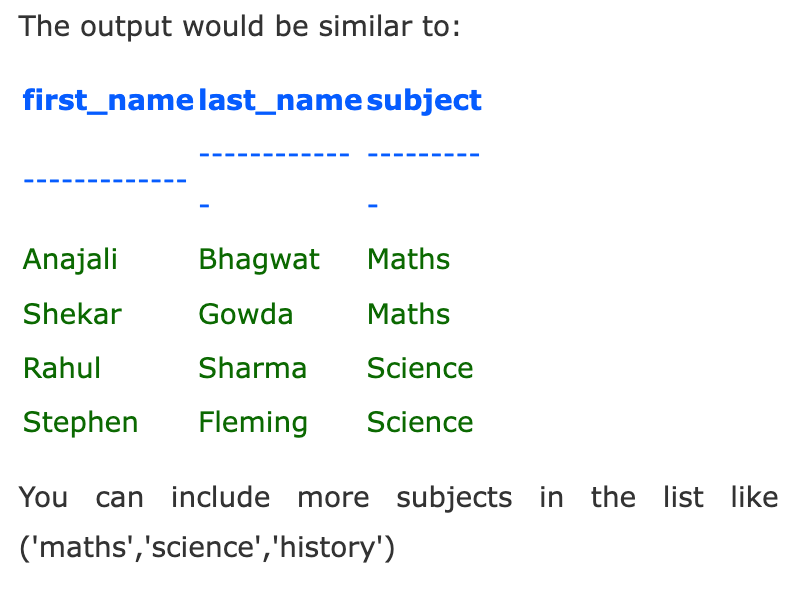
- If you want to find the names of students who are studying either Maths or Science, the query would be like,
SELECT first_name, last_name, subject
FROM student_details
WHERE subject IN ('Maths', 'Science');
- The data used to compare is case-sensitive.
IS NULL
- A column value is NULL if it does not exist. The IS NULL operator is used to display all the rows for columns that do not have a value.
- If you want to find the names of students who do not participate in any games, the query would be as given below.
SELECT first_name, last_name
FROM student_details
WHERE games IS NULL
3. GROUP BY
- Groups rows that have the same values.
SELECT SUM(salary) AS total_salary, department
FROM employees
GROUP BY department
4. ORDER BY
- These are sorted in ascending order.
- The lower the value, the earlier in the list it comes. The larger, the later it comes to the list.
SELECT first_name, last_name
FROM people
ORDER BY first_name DESC;
- I can change the last name sort to descending order while the state is still in the default ascending order. And here, I can see that the sort order of the states is still the same, but now the records are reordered in
reverse alphabetical sequenceby the last name within the state.
SELECT state_code, frst_name, last_name
FROM people
ORDER BY state_code, last_name DESC;
5. LIMIT n
- Select the first n rows for all columns
- If I wanted to see a specific range of them, like the second set of five, I could use
the offset commandto tell the databaseto skip some recordsbefore counting off my five.
SELECT *
FROM people
WHERE state_code like 'C%'
LIMIT 5 OFFSET 5; #The results will be limited to 10 records, skipping the first five records.
6. HAVING
- In SQL, aggregation functions such as SUM, AVG, MAX, MIN, and COUNT can not be used in the WHERE clauses. If we want to filter our table by an aggregation function, we need to use the HAVING clauses.
Ex) Which departments have more than 50 employees?
SELECT COUNT(*) AS total_employee, department
FROM employees
GROUP BY department
HAVING COUNT(*) > 50
-
The HAVING clause is applied after GROUP BY, so you cannot use SUM(beds) in HAVING without properly grouping the data. Here’s the corrected query:
SELECT neighbourhood, AVG(beds) AS average_beds
FROM airbnb_search_details
GROUP BY neighbourhood
HAVING SUM(beds) >= 3
ORDER BY average_beds DESC;
Difference between ‘where’ and ‘having’ clauses
| Feature | WHERE |
HAVING |
|---|---|---|
| When it’s applied | Before grouping/aggregation | After grouping/aggregation |
| Filters | Individual rows | Groups (or aggregated results) |
| Use with aggregates | No (works on raw data only) | Yes (works with aggregate functions) |
| Example Use | WHERE beds > 3 |
HAVING AVG(beds) > 3 |
Subqueries
A subquery is a SQL query nested inside a larger query. A subquery may occur in:
- a SELECT clause
- a FROM clause
- a WHERE clause
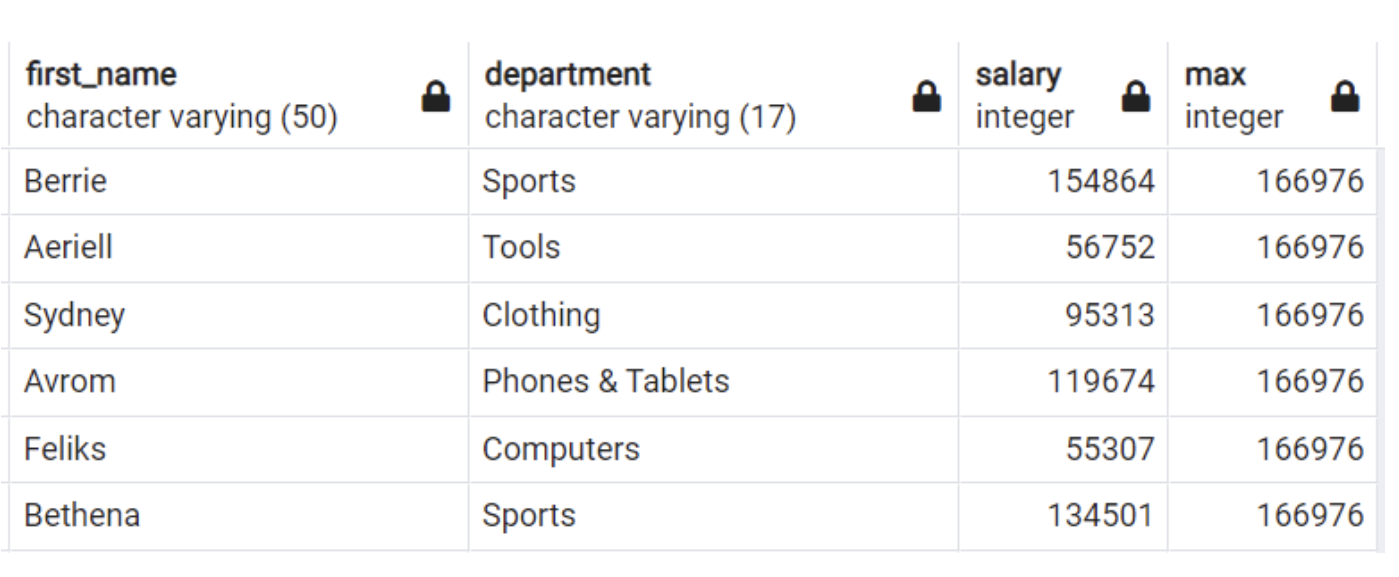
Query first_name, department, and salary of each employee and also the maximum salary given.
SELECT first_name, department, salary,
(SELECT max(salary) FROM employees)
FROM employees
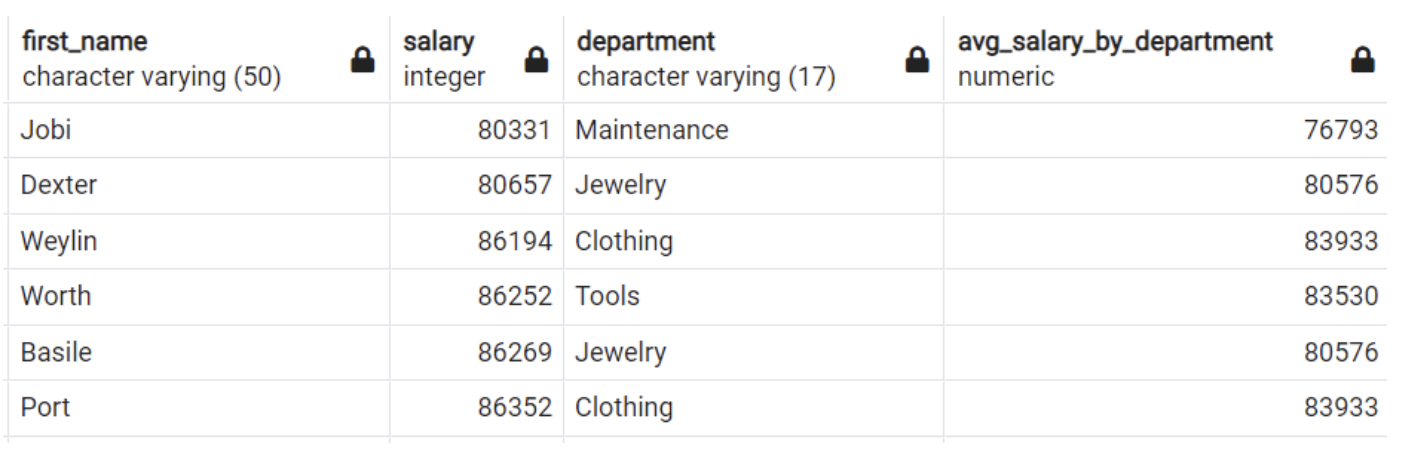
SELECT first_name, salary, department, round((SELECT AVG(salary)
FROM employees e2
WHERE el.department = e2.department
GROUP BY department )) as avg_salary_by_department
FROM employees el
WHERE salary > (SELECT AVG(salary)
FROM employees e2
WHERE el.department = e2.department
GROUP BY department )
ORDER BY salary
select tb1.salary
from(
     select salary, dense_rank() over(order by salary DESC) as dnr
     from employees
     where department_id in (select id from departments where name = 'engineering')
) as tb1
where tb1.dnr=2
Case When Clause
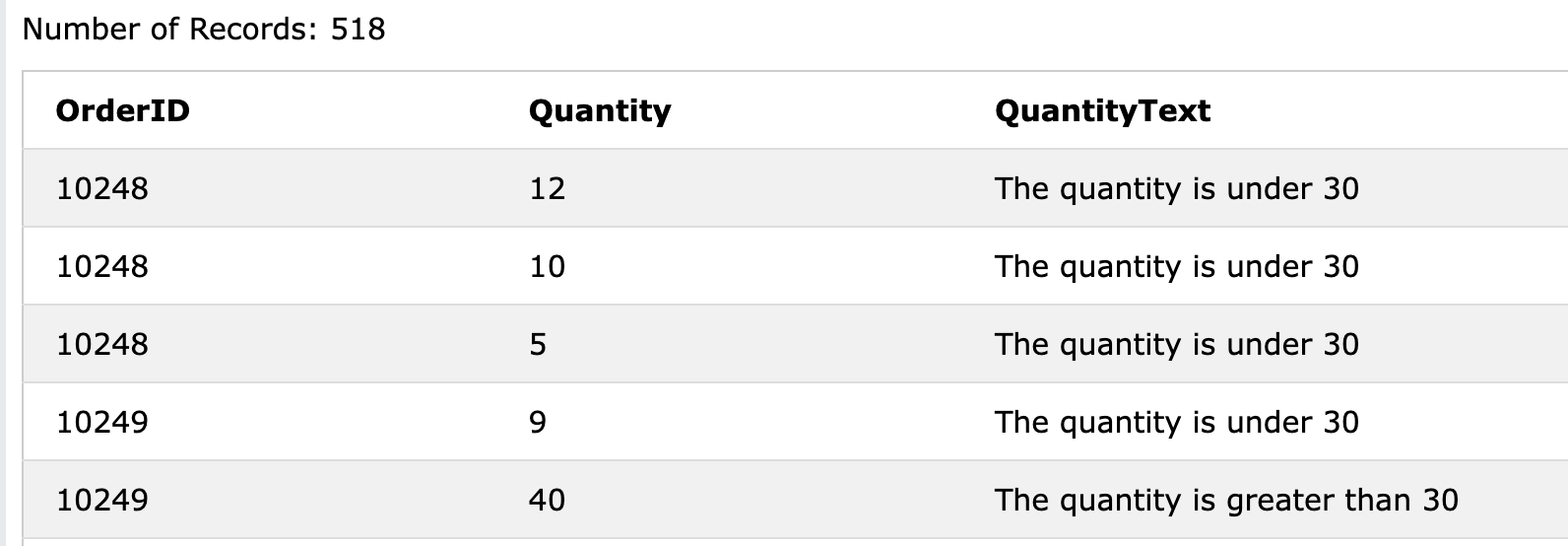
The CASE statement is used to implement the logic where you want to set the value of one column depending on the values in other columns.
It is similar to the IF-ELSE statement in Excel.
CASE
    WHEN condition1 THEN result1
    WHEN condition2 THEN result2
    WHEN conditionN THEN resultN
    ELSE result
END;
SELECT OrderID, Quantity,
CASE
    WHEN Quantity > 30 THEN 'The quantity is greater than 30'
    WHEN Quantity = 30 THEN 'The quantity is 30'
    ELSE 'The quantity is under 30'
END AS QuantityText
FROM OrderDetails;
- The following SQL will order the customers by City. However, if City is NULL, then order by Country:
SELECT CustomerName, City, Country
FROM Customers
ORDER BY
(CASE
    WHEN City IS NULL THEN Country
    ELSE City
END);
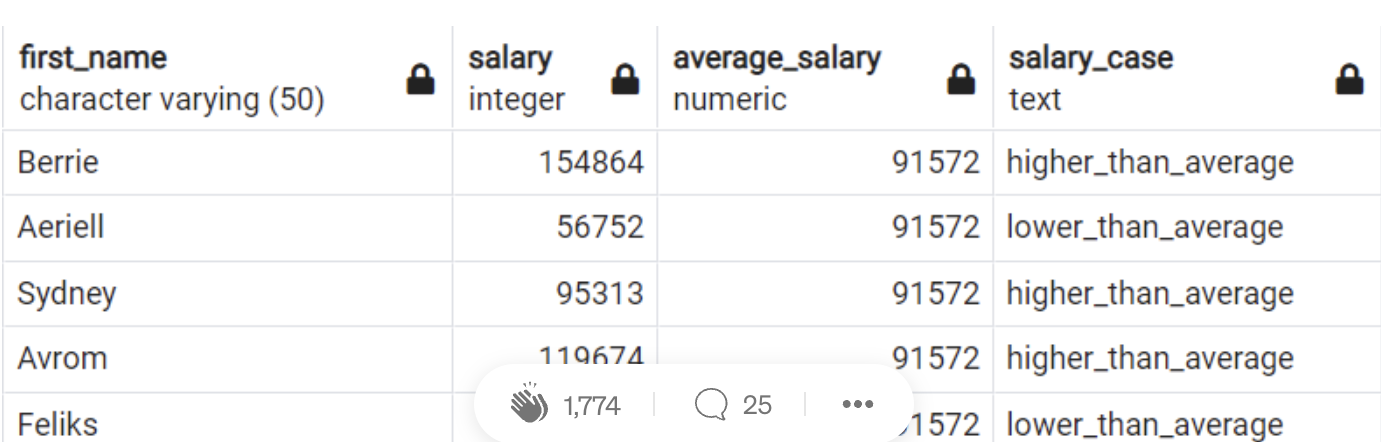
Write a query to print the first name, salary, and average salary as well as a new column that shows whether employees’ salary is higher than average or not.
SELECT first_name, salary, (SELECT ROUND(AVG(salary)) FROM employees) as
average_salary,
(CASE WHEN salary > (SELECT AVG(salary) FROM employees) THEN 'higher_than_average'
ELSE 'lower _than_average' END) as Salary_Case
FROM employees
Functions
1. Length
It tells us how long the information in the given field is in characters rather than the value of the field itself.
- Janice is six characters long.
SELECT first_name, length(first_name)
FROM people
2. Date Functions
In PostgreSQL, you can easily extract values from date columns. You will see the most used date functions below.
SELECT
date_part ('year', hire_date) as year,
date part ( 'month', hire_date as month,
date_part ('day', hire_date) as day,
date_part ( 'dow', hire_date) as dayofweek,
to_char(hire date, 'Dy') as day_name,
to_char(hire date, 'Month') as month name,
hire date
FROM employees
In MySQL,
- YEAR() returns the year for a given date. The return value ranges from 1000 to 9999 or 0 for the ‘zero’ date.
- MONTH() returns the MONTH for the date within a range of 1 to 12.
- DAY() returns the day of the month for a specified date. The day returned will be within the range of 1 to 31.
SELECT pub_name,estd,MONTH(estd) as 'Estd. MONTH'
FROM publisher
WHERE MONTH(estd)>7;
3. Window Functions
Window functions aggregate and ranking functions over a particular window (set of rows).
- OVER clause is used with window functions to define that window. OVER clause does two things:
- PARTITION BY: Partitions rows to form the set of rows
- ORDER BY: Orders rows within those partitions into a particular order
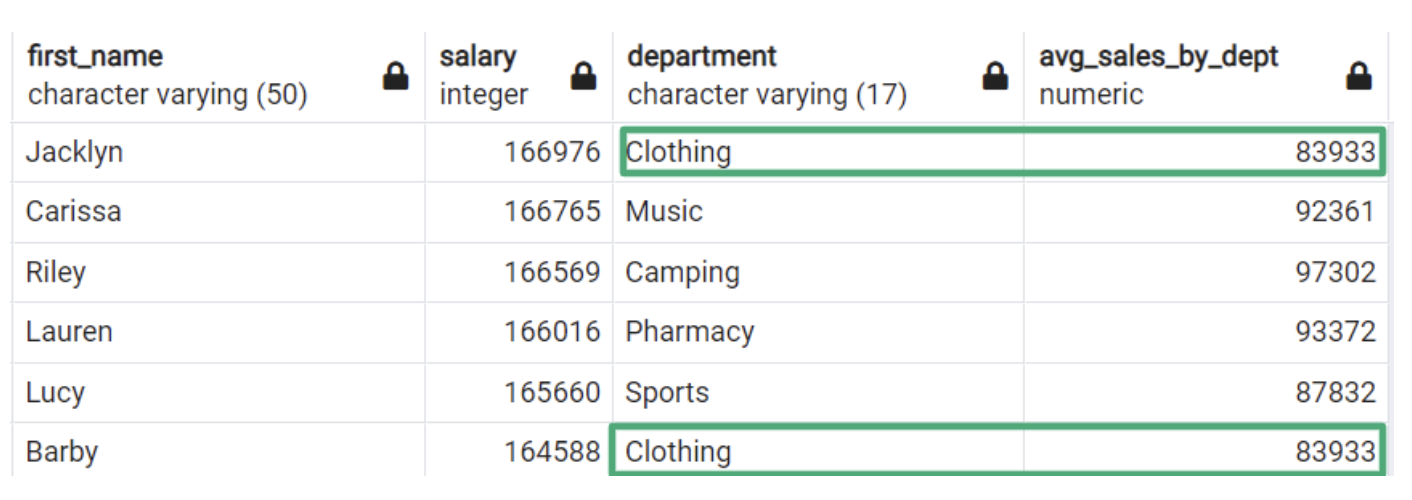
Aggregate window functions
: Aggregate functions applied over a particular window (set of rows)
SELECT first_name, salary, department,
ROUND( AVG(salary) OVER (PARTITION BY department)) as avg_sales_by_dept
FROM employees
ORDER BY salary DESC
Rank () Function
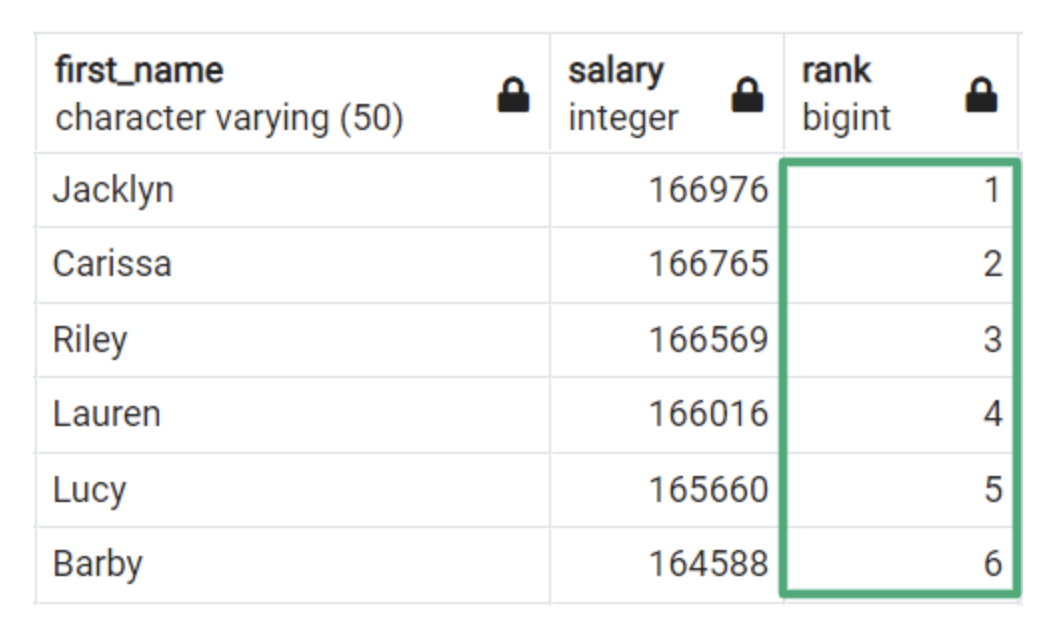
: A window function that assigns a rank to each row within a partition of a result set. A rank value of 1 is the highest salary value.
SELECT first_name, salary,
RANK() OVER(ORDER BY salary DESC)
FROM employees
Dense_rank() Function
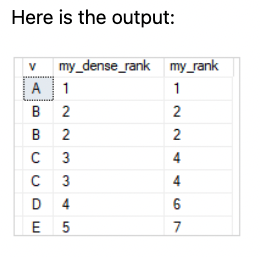
: A window function that assigns a rank to each row within a partition of a result set. Unlike the RANK() function, the DENSE_RANK() function returns consecutive rank values. Rows in each partition receive the same ranks if they have the same values.
Leave a comment